How to configure your Nonoh SIP device
You can use your Nonoh account with a wide range of SIP-compatible devices and applications. Simply sign up for an Nonoh account and use your Nonoh username and password to register your device with our SIP servers.
Network Setup
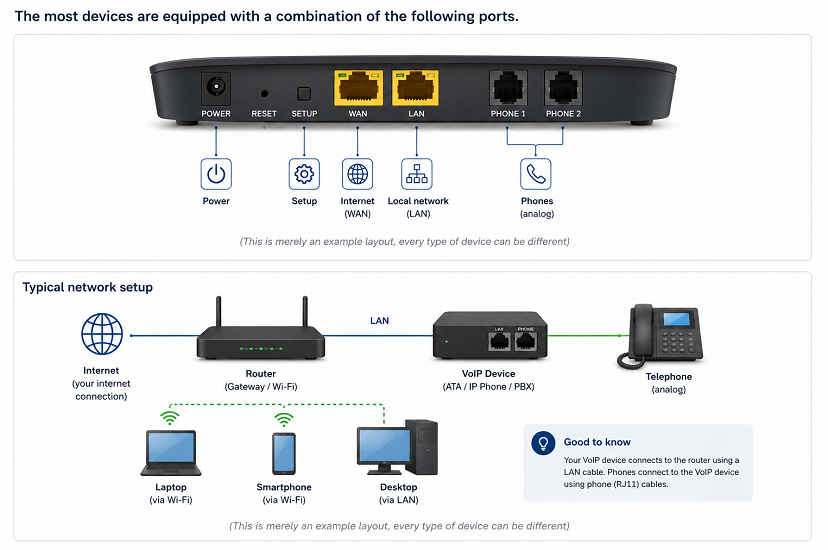
SIP configuration
| Setting | Value |
|---|---|
| SIP server (Registrar) | sip.nonoh.net |
| Proxy server | sip.nonoh.net |
| Outbound proxy | Leave empty (not required) |
| SIP port (UDP) | 5060 |
| SIP port (TLS) | 5061 |
| Username | Your Nonoh username |
| Password | Your Nonoh password |
| Display name / Caller ID | Your Nonoh username or verified (VoIPIn) number |
| STUN server (optional) | stun.nonoh.net:3478 |
Supported SIP devices
 Softphones for Windows, macOS and Linux (such as Linphone, Zoiper,
MicroSIP and Bria)
Softphones for Windows, macOS and Linux (such as Linphone, Zoiper,
MicroSIP and Bria)
|
|
Mobile SIP apps for Android and iOS (such as Linphone, Zoiper and
Groundwire)
|
|
IP desk phones (such as Yealink, Grandstream, Snom and Fanvil)
|
|
SIP ATAs (Analogue Telephone Adapters) (such as Grandstream HT801/HT802
and Cisco SPA112)
|
|
IP PBXs (such as Asterisk, FreePBX, 3CX and FreeSWITCH)
|
|
SIP routers and VoIP gateways (such as MikroTik, DrayTek and Cisco)
|
Supported SIP protocols
|
SIP over UDP (default)
|
|
SIP over TLS for encrypted SIP signalling
|
Note: SIP over TLS encrypts the SIP signalling between your device and our servers. Voice media is transmitted using standard RTP. SIP over TLS uses the standard port 5061, which is automatically selected by most SIP clients when TLS is enabled.
Supported audio codecs
|
G.711 U-law (PCMU) – High quality (64 kbps)
|
|
G.711 A-law (PCMA) – High quality (64 kbps)
|
|
G.722 – HD Voice (wideband audio)
|
|
G.729a – Low bandwidth (8 kbps)
|
|
G.726 – Medium bandwidth (32 kbps)
|
|
iLBC – Optimized for unreliable network connections
|
Note: During call setup, your SIP device and our servers automatically negotiate the best available codec supported by both sides. In most cases, no manual codec configuration is required.
Troubleshooting audio issues
If you experience one-way audio or other audio-related problems, try the following:
Configure a STUN server (if supported by your SIP
device or application):
|
|
Prefer the G.711 codec for the best compatibility and call quality.
|


- Type in your phone number
- Type in your friends phone number
- Click "CALL"
Your phone will ring -
pick up -
start talking!
Having trouble?
Click here to get help